Saturday, November 24, 2007

Photosop mini lesson #1


First lets start with something you probably all ready know but for those Photoshop virgins out there, we will share. The Bar at the left side of the page we will refer to as our toolbar. On the lower right corner of most of the tools you will see a tiny triangle, this means there are other tools that are hiding behind the tool showing. If you click on the tool and keep your mouse button pressed for a few seconds, you will see the pop up menu as displayed above that shows the tools hidden behind. You can move your mouse over and click on one of the other tools to bring it to the forefront on the toolbar and use it as an active tool.

On the toolbar, look to the left column of tools, about midway down you will see that I have clicked on the lollypop looking thing. That is called the dodge tool, behind it are the burn & smudge tools. Lets say you have an object in a photo that is shaded, maybe someones face has a shadow, the Dodge tool can help. If you have an overly bright area, the burn tool could help there.

Dodge & Burn Tools:
First a few tips:
If you have very dark shaded areas, they probably dont have a lot of digital detail so even after using the dodge tool, you could still end up with grayish shadows.
If you have overly lightened areas, the burn tool may not have good results either.
You'll want to use either of these tools in moderation and work on small areas.

1)Click on either of these tools to activate it.
2)Choose your brush (It is usually best to zoom in fairly close to the part of the photo that you are wanting to work on and using softer brushes will blend better to the surrounding parts of the photo)
3)Now Choose the range option you desire
shadows to lighten or darken
midtones to adjust the tones of average darkness
highlights to make the brightest areas even lighter or usually, darker.
4)By using the exposer slider/text box, choose the amount of the effect you want to apply.
5)Now click on the areas of the photo that you would like your desired effect on (or hold down your mouse button and “brush” across the area), until you are satisfied with the outcome. The more times you go over the same spot, the more it will increase the effect. It Be careful not to over-do it but if you do, you can always back up via your History Palette. (Please notify if you need to know more about the History Palette and we'll cover that next)

Below are some samples of using the Dodge tool. Notice how her hair is so dark that it blends into the background, on a few of the photos I did try to lighten her hair too but as the tip above states, due to the lack of digital detail, nothing really resulted.


Original


Using shadows @ 22%


Midtones @ 50%


Highlights @ 25%


Obviously you will get different results for different photos & circumstances. You will need to just play with what looks good to the eye until you find what works.

Monday, November 19, 2007

? OW ( quezztion of the week)

O.k. since I was the first one to answer last week's question it's my turn to ask :)

What are the 3 most important things in your house that you can't leave without?

My 3 things are:
1. Shower
2. Computer
3. Coffee

Sunday, November 18, 2007

Weekly Challenge #46: Extreme Makeover-Layout Edition


Let me begin by thanking our beautiful Brenda for giving us a "Second Chance" to meet some past challenges.


If you haven't already, please be sure to check these out:
Lisa's Weekly Challenge #39 The Men in My Life
Brenda's Weekly Challenge #39 My Man (Triathlon 1-2)
Brenda's Weekly Challenge #39 My Man (Triathlon 3-4)
Brenda's Weekly Challenge #40 Aaron's First Eagle
Denitza's Weekly Challenge #5 Little Man
Denitza's Weekly Challenge #3 Leave Your Mark
Tiffany's Weekly Challenge #39 U fill my heart
Tiffany's Weekly Challenge #40 do your best


There were some other great layouts that you should all check out on the layout thread!

If I missed anyone, please send me a private message, so that I can update.

Extreme Makeover: Layout Edition
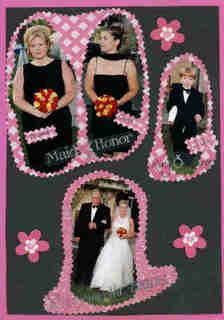
After some discussion on the thread, I decided to challenge you fabulous girls to find an older layout and update it. Some in our group haven't been scrapping long, but even still our earlier layouts are noticeably different from our more recent ones. However, some of us have been scrapping for over 10 years, and, well, a few pictures are worth a thousand words.
Click if you dare:

Have some cake!

Walking down the aisle.

The horror! Why didn't someone do an intervention with the evil deco-scissors? WHY?
As you can see, I have my work cut out (pun intended) for me. I hope you can find something too.
When you post your response to the weekly challenge, please link us to the original, as well. :D The due date (which the Governor has noticed was missing) is 11/25/07
xoxoxoxoxo

Wednesday, November 14, 2007

QueZZtion of the Week

Ok Ladies, here it is....

With Thanksgiving just around the corner, name 6 things you are thankful for. Sound easy? Well I'm going to make you think about that for a little bit. You have to use the Letters in "Turkey" to begin each word or phrase. Get as creative as you want!

1)The love of my family
2)U terrific gals!
3)Realization that life is really a gift
4)Knowing I have friends who care
5)Eating yummy foods....
6)Yesterday, today and tomorrow and capturing it all for future generations to see.

Sunday, November 11, 2007

WC #45-Choose Your Challenge (aka Second Chance Challenge)

Thank your lucky stars for the stellar zodiac los from
* MyNitzza, our inventive Virgo Virgo
* and Tiffany, our horny Aries Such an Aries

The year is winding down, the Holidaze are creeping up on us and, before you know it, it's time for the New Year and a whole new set of Weekly Cha--er, Biweekly Challenges. It got me thinking about the WCs I've missed that I always intended to complete and how that feeling of leaving things unfinished continues to gnaw away at me. If you've ever felt like me on this one, here's your second chance. Choose a WC from the past and fulfill it. When uploading your lo, please label your description WC #45/WC #?? [Past WC Title]. I have kept track of the WC titles on an old SHCG thread. Click here to view the list. Let me know if you have any questions about a particular week's details; otherwise, WC #5 is the earliest one detailed in our blog. For those who are feeling particularly ambitious, try completing two or more los for other WCs you've missed. I'm looking forward to some blasts from the past!

Tuesday, November 6, 2007

Contest!!!

We had one of these a really long time ago, and I was just browsing through the old thread and thought this would be a good thing to have just for fun.
The contest is based around journaling. What I want you to do is create some journaling for the picture below. You can write anything you want, but make it as if this was a picture you took and you were going use this picture on a scrapbook page. Write your journaling as you would if you were telling the story on your LO. It can be serious or funny, just have fun with it!!


Have at it!!
When you write your journaling, PM me your entry. I'll post them all here one week from today, and then we can vote on them once they'er posted. Please do not post them here, we dont want anyone getting your ideas!!! So the due date for this to be PM'd to me is 11/13/07. Have fun!!!

Monday, November 5, 2007

WC#44-Zodiac Signs

This week I challenge you to scrap your zodiac sign. Or if you like, scrap the sign of a loved one.Can't wait to see what you all come up with! Get busy!

Last week's challenge,"Making Headlines" was completed by: